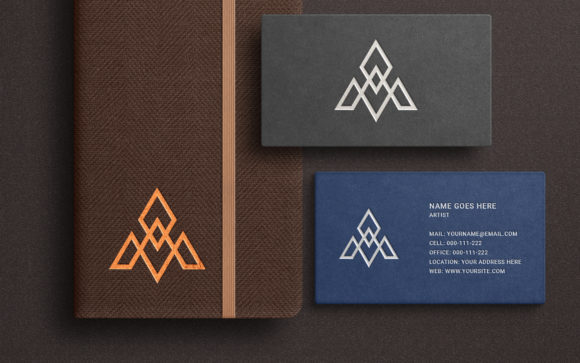
Notebook Business Card Logo Mockup
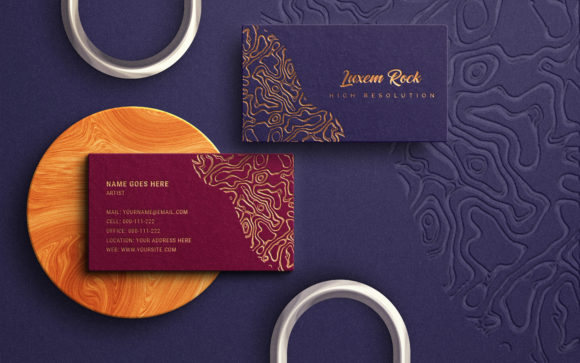
For designers, entrepreneurs, and professionals looking to present their brand or logo in a compelling and realistic way, the Notebook Business Card Logo Mockup is an invaluable tool. This exclusive design resource allows you to visualize your business card as if it were sitting on the cover of a stylish notebook, complete with vibrant color options and lifelike effects. Whether you're finalizing your branding for a client, showcasing your own identity, or simply want to see how your design looks in context, this mockup provides a clean, professional canvas that brings your work to life.
Why Use a Notebook Business Card Logo Mockup?
A well-designed business card can make a lasting impression, but without the right presentation, its potential impact may be lost. The Notebook Business Card Logo Mockup bridges the gap between digital design and real-world application by simulating a tangible environment where your business card becomes part of a larger visual story. It’s particularly useful when you need to show off your logo in a creative setting—like during a pitch, portfolio review, or marketing campaign—where aesthetics matter just as much as content.
This mockup is ideal for anyone who wants to demonstrate their brand in a unique and visually appealing format. Educators might use it to teach students about branding and typography, while freelancers could leverage it in proposals to highlight their professionalism. Marketers and bloggers will find it handy for social media posts, where eye-catching visuals are essential for engagement.
Key Features That Make It Stand Out
- Smart Object Layer: The mockup uses Photoshop’s Smart Object feature, making it incredibly easy to insert your design into the template. Just double-click the designated layer and place your logo or text inside—it’s that simple.
- High-Quality Resolution (4000 x 2500 pixels): The mockup is built at a high resolution, ensuring that your designs look crisp and clear in both digital and print formats.
- 300 DPI RGB: Designed for optimal clarity and color accuracy, this mockup meets professional printing standards and works perfectly for online presentations.
- Fully Editable Layers: Everything from lighting to background textures is organized neatly within the PSD file, allowing you to tweak the scene to match your vision or brand guidelines.
- Software Compatibility: Requires Photoshop CC or newer versions, which ensures access to the latest tools and features for maximum flexibility.
- Clean and Realistic Effects: The mockup mimics natural lighting and material textures, giving your logo a polished, professional look that feels authentic.
- Custom Color Support: You’re not limited to one aesthetic. The Notebook Business Card Logo Mockup supports custom colors and backgrounds, letting you experiment with different styles and themes.
How to Use the Notebook Business Card Logo Mockup
The process is straightforward and designed to save time. Once you’ve downloaded the .psd file, open it in Photoshop. Look for the layer named “Place your design” and double-click the smart object icon. A new window will pop up where you can insert your logo, text, or shape. After placing your content, remember to save the file using File > Save or the shortcut Ctrl + S on PC. With just a few clicks, you’ll have a stunning visual that accurately represents your design in a real-life scenario.
What sets this mockup apart is its intuitive layout. You don’t need advanced Photoshop skills to use it effectively. The layers are clearly labeled and structured, so even beginners can navigate the file with ease. This makes it a go-to solution for quick edits and last-minute design reviews.
Real-World Applications Across Industries
Let’s explore some practical ways this mockup can be used across different fields:
Professional Branding
Entrepreneurs and small business owners often struggle to showcase their brand identity effectively. Using the Notebook Business Card Logo Mockup, they can present their logos and contact cards in a more sophisticated and relatable manner. Imagine sending a client a proposal with a mockup image showing your business card as part of a sleek notebook cover—it adds a touch of class and reinforces your brand’s attention to detail.
Marketing and Advertising
In the world of marketing, visuals are everything. This mockup can be used to create promotional assets such as Instagram posts, email headers, or website banners. For example, a freelance designer promoting their services can include the mockup in a blog post to give readers a better idea of what the final product looks like. The realistic effect helps build trust and credibility, making it easier to convert leads into clients.
Education and Design Training
Educators can integrate this mockup into their curriculum to help students understand the importance of visual context in design. By placing student-created logos into the notebook mockup, instructors can demonstrate how elements like font choice, spacing, and color interact with real-world objects. This hands-on approach enhances learning and encourages creativity.
Creative Projects and Freelance Work
Freelancers working in graphic design, illustration, or web development can benefit greatly from this tool. When pitching a project, having a visual that shows your logo or branding concept in action can make a huge difference. The Notebook Business Card Logo Mockup acts as a versatile backdrop for various types of branding materials, helping you stand out in a competitive market.
Personal Use and Hobbyists
If you're a hobbyist or DIY enthusiast creating a personal brand, this mockup offers an affordable and effective way to test your designs before printing. It’s perfect for those experimenting with fonts, shapes, and color schemes to find the best fit for their style. No need to invest in expensive photography—this mockup does the trick with minimal effort.
Benefits Beyond the Basics
Beyond the obvious visual appeal, the Notebook Business Card Logo Mockup offers several underlying benefits that contribute to a better user experience and more effective communication:
- Time Efficiency: The smart object feature eliminates the need for complex editing techniques. You can focus on your design rather than struggling with the mockup setup.
- Enhanced Communication: Presenting your logo in a realistic setting helps others grasp the intended look and feel more quickly. Clients, colleagues, and stakeholders get a clearer picture of how the design will function in practice.
- Improved Branding: Seeing your logo on a notebook gives it a sense of presence and permanence. It's a subtle but powerful way to communicate professionalism and thoughtfulness.
- Greater Engagement: On platforms like LinkedIn, Behance, or Dribbble, images that show real-world applications tend to receive more likes, shares, and comments. This mockup helps you create engaging visuals that stop the scroll.
- Cost-Effective Presentation: Instead of hiring a photographer or building physical prototypes, you can generate high-quality mockups in minutes using Photoshop and this template.
What You Get and How to Maximize Its Value
When you purchase the Notebook Business Card Logo Mockup, you receive:
- 1 High-Quality PSD File: Fully customizable and compatible with modern Photoshop versions.
- 3 Preview Images: These can be used as references or shared directly with clients to provide a sneak peek of the final result.
To maximize the value of this mockup, consider experimenting with different background colors and lighting conditions. You can also combine it with other branding assets, such as letterheads or website screenshots, to create a cohesive visual narrative. Don’t hesitate to adjust the layers—changing shadows, reflections, or paper textures can significantly enhance the realism and adaptability of the final image.
Practical Considerations for Selection and Use
Before choosing the Notebook Business Card Logo Mockup for your project, keep a few things in mind:
- Check Software Requirements: Ensure you have Photoshop CC or above installed. If not, you may need to upgrade or use alternative software that supports smart objects.
- Consider Your Audience: Think about the context in which the mockup will be viewed. Will it be used for print, digital media, or client presentations? Each scenario may require slight adjustments in layout or resolution.
- Test Different Fonts and Colors: Since the mockup supports any font or shape, take advantage of this by testing various combinations to see what works best for your brand.
- Stay Organized: Because the file includes multiple layers, it’s important to name and group them properly after making changes. This will make future edits quicker and more efficient.
- Use as a Template: Once you become familiar with the structure, you can reuse the mockup for other projects—just replace the smart object and tweak the settings slightly for each new design.
Final Thoughts and Recommendations
The Notebook Business Card Logo Mockup isn’t just another design template—it’s a strategic asset for anyone who values visual storytelling and brand representation. Its combination of realism, customization, and ease of use makes it suitable for a wide range of applications, from casual personal branding to high-stakes marketing campaigns.
Here’s a quick recommendation: always pair your mockup with a short description or caption explaining the purpose of the design. Whether it’s for a client presentation or a social media post, adding context helps viewers connect with your work on a deeper level. Also, consider exporting the final image in multiple formats (PNG, JPEG, etc.) to ensure compatibility across platforms.
With thoughtful implementation, the Notebook Business Card Logo Mockup can elevate your design workflow and improve the way you communicate your brand’s identity. So next time you need to show off your logo, think beyond the flat image—place it in a scene that tells a story and makes an impression.