Letterhead Design Template: A Practical Guide for Professional Branding
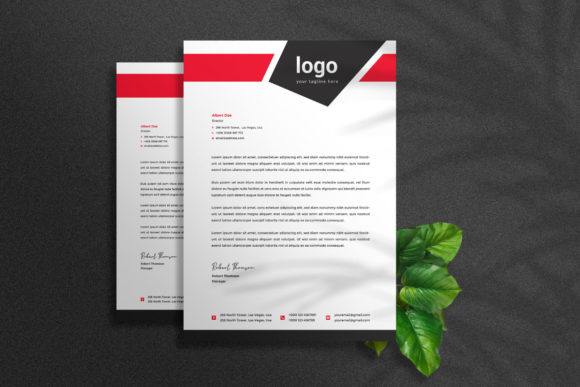
A letterhead design template is a pre-formatted layout used to create official company stationery. It typically includes elements such as the company name, logo, address, phone number, and other branding details. Letterheads are essential for maintaining a consistent and professional image in business correspondence. With the right tools and templates, creating or customizing a letterhead can be both efficient and effective.
Why Use a Letterhead Design Template?
Many professionals and organizations use letterhead design templates because they offer a structured approach to branding and communication. These templates ensure that all outgoing documents — from letters to invoices — reflect the same visual identity. This consistency helps build trust with clients, partners, and stakeholders.
Additionally, using a corporate letterhead design template can save time and effort. Instead of designing each document from scratch, users can simply insert their content into an existing format. For those who require frequent printing or digital sharing of business documents, this can significantly streamline workflow.
Key Features of Adobe Illustrator-Based Templates
When it comes to professional design, Adobe Illustrator is a go-to tool for its precision and scalability. A letterhead design template built in Adobe Illustrator typically offers:
- Standard Size: Most templates are designed for A4 (8.27” x 11.69”), ensuring compatibility with common printing standards.
- Print-Ready Format: Files are provided in AI and EPS formats, which are ideal for high-quality printing and editing.
- Bleed and Resolution: Includes 0.125 inch bleed and 300 DPI resolution for clean, sharp prints.
- Color Mode: Uses CMYK color mode, optimized for print output rather than screen display.
- Multiple Color Variations: Offers four different color schemes to match various brand identities or preferences.
- Organized Layers: Ensures ease of editing by separating text, images, logos, and background elements into distinct layers.
- Editable Elements: Users can easily modify text, logo placement, colors, and images without compromising the overall design.
- Help Guide Included: Provides step-by-step instructions to help even beginners customize the template effectively.
- Font Accessibility: Only free fonts are used, with direct links provided in the help file for easy download and installation.
Benefits of Using a Corporate Letterhead Design Template
There are several advantages to using a corporate letterhead design template, especially when it's created with Adobe Illustrator:
- Professional Appearance: A well-designed template elevates the look of any business document, projecting professionalism and credibility.
- Time Efficiency: The template structure allows users to focus on content rather than formatting, speeding up the creation process.
- Brand Consistency: By using a standardized template across all communications, businesses maintain a unified brand presence.
- Customization Flexibility: Users can tailor the template to suit their specific needs, whether adjusting colors, fonts, or adding graphics.
- Cost Savings: Avoids the need for hiring a graphic designer for every new letterhead version, especially when free fonts are used.
Potential Tradeoffs and Considerations
While letterhead design templates provide numerous benefits, there are also some factors to consider before choosing one:
- Limited Originality: Pre-made templates may not offer complete uniqueness unless heavily customized. Businesses seeking a one-of-a-kind design may find them restrictive.
- Learning Curve: Although most templates come with a help guide, editing Adobe Illustrator files requires at least basic familiarity with the software.
- Design Quality Varies: Not all templates are created equal. Some may lack attention to detail, which could affect the final output’s quality.
- No Mockup Included: While the template is fully editable and organized, the mockup preview image is not part of the package. Users must visualize the final product themselves or seek external tools for realistic previews.
When a Letterhead Design Template Is a Strong Fit
A letterhead design template is particularly suitable in the following scenarios:
- Established Businesses: Companies with an existing brand identity will benefit from using a template to reinforce their visual style consistently.
- Startups on a Budget: Small businesses or startups looking to establish a professional image without significant design costs can leverage these templates effectively.
- Frequent Printing Needs: Organizations that regularly produce printed materials like letters, proposals, or reports can streamline their production with a ready-to-print template.
- Graphic Designers and Print Shops: Professionals in the design industry often use these templates as a starting point for client projects, reducing setup time and increasing efficiency.
When Alternatives May Be Worth Considering
Despite the benefits, there are situations where a letterhead design template might not be the best option:
- Unique Brand Requirements: If your brand has very specific design needs or unconventional aesthetics, a custom design might be more appropriate than a standard template.
- Non-Adobe Users: Individuals unfamiliar with Adobe Illustrator may prefer templates in simpler formats like Word or PDF, though these won’t offer the same level of customization.
- Digital-Only Usage: For purely digital communications, a less complex design might suffice, and vector-based templates may not be necessary.
- Dynamic Content Needs: If you frequently change the layout or content structure of your documents, a highly flexible template or web-based solution might be better suited.
Practical Tips for Choosing the Right Template
Here are some insights to help you make an informed decision about whether a letterhead design template aligns with your goals:
- Evaluate Your Brand Identity: Look for a template that complements your current branding elements, including colors, fonts, and imagery.
- Check Compatibility: Ensure the template works with your version of Adobe Illustrator and supports the required printing specifications.
- Review File Organization: A well-organized file with separated layers makes editing straightforward and reduces the risk of errors during customization.
- Test Before Committing: Customize a sample document using the template and review how it looks both digitally and in print to confirm it meets your expectations.
- Consider Future Use: Choose a template that can adapt to future changes in your business, such as rebranding or expanding your communication formats.
Expectations and Best Practices
When working with a letterhead design template, it’s important to manage your expectations:
- Not All-Inclusive: As mentioned earlier, the template does not include a mockup preview. You’ll need to rely on your own judgment or additional resources for visual confirmation.
- Basic Customization Skills Required: While the template is easy to edit, users should have a basic understanding of design principles to achieve the best results.
- Attention to Detail Matters: Even with a well-structured template, small errors in alignment, spacing, or typography can impact professionalism.
- Version Control: Since multiple versions (AI and EPS) are included, ensure you’re using the correct one depending on your intended purpose — design work versus export for printing.
Conclusion
A letterhead design template, especially one crafted in Adobe Illustrator, can be a valuable asset for businesses aiming to maintain a cohesive and professional appearance in their printed and digital communications. Its features — including high-resolution settings, multiple color variations, and organized layers — make it a practical choice for many users. However, it's essential to weigh the tradeoffs, such as limited originality and the learning curve associated with Adobe Illustrator.
Ultimately, the decision to use a corporate letterhead design template depends on your specific needs, budget, and technical capabilities. For those who value efficiency and consistency, a well-structured template can be a strong fit. But if you're seeking a truly unique design or have no access to Adobe Illustrator, exploring alternative options may be more beneficial.