Understanding Corporate Rollup Banner Templates: A Guide for Designers and Businesses
A corporate rollup banner is a versatile marketing tool that plays a crucial role in brand visibility, event promotion, and business communication. When designed professionally, it can leave a lasting impression on your audience. One of the most effective ways to create such banners is by using corporate rollup banner templates. These templates streamline the design process, ensuring consistency with your branding while saving time and effort.
What Is a Corporate Rollup Banner Template?
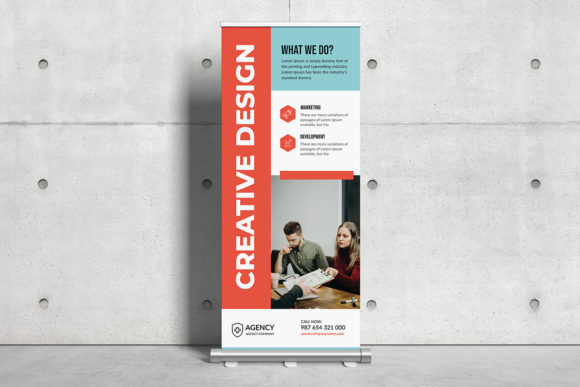
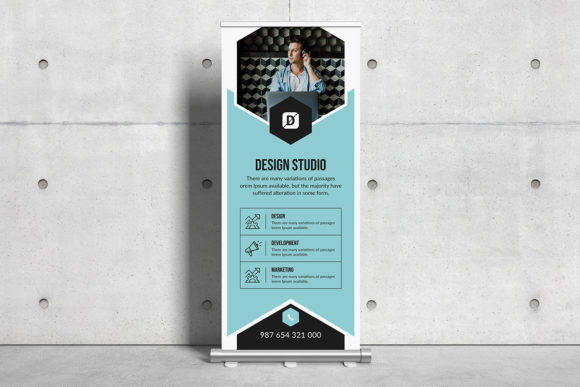
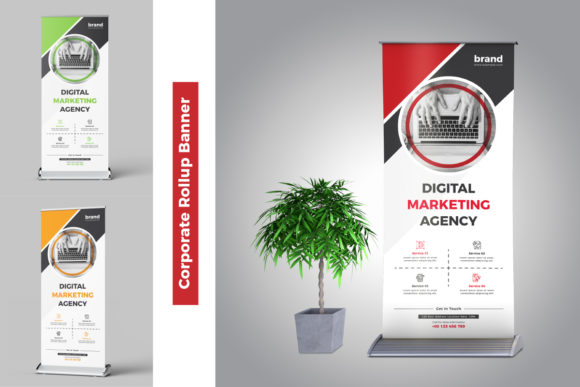
A corporate rollup banner template is a pre-designed layout used to create professional-looking banners quickly. It typically includes placeholders for logos, text, images, and other branding elements. These templates are commonly provided in file formats like Eps (Adobe Illustrator), which allow for high-quality printing and easy customization. They are especially useful for businesses or individuals who need to produce multiple banners with similar designs but different content.
Such templates are often available with specifications like 300 DPI resolution, CMYK color mode, and standard dimensions like 70 x 30 inches with a 0.125-inch bleed. These details ensure that the final printed product is clear, accurate, and ready for professional use without additional trimming or scaling.
Key Features of Corporate Rollup Banner Templates
- High-Resolution Output: The 300 DPI resolution guarantees crisp and clean prints, making the banner visually appealing from a distance.
- Vector-Based Files: Eps and Ai files are vector-based, meaning they retain quality at any size—perfect for large-format printing.
- CMYK Color Mode: This color profile is essential for print media, ensuring colors appear consistent across different printers and materials.
- Standard Size and Bleed: With a typical size of 70 x 30 inches and a 0.125-inch bleed, these templates meet industry standards for signage production.
- Customization Friendly: Designed for Adobe Illustrator 2018 CC and later, they offer flexibility for users to modify fonts, colors, and layouts easily.
- Free Font Use: Many templates come with embedded or recommended fonts that can be used without additional licensing fees, simplifying the design workflow.
Why Use a Corporate Rollup Banner Template?
Creating a corporate rollup banner from scratch can be both time-consuming and challenging, particularly if you're not an experienced designer. Using a template eliminates much of the guesswork and ensures that your banner meets all technical and aesthetic requirements right out of the box.
Time Efficiency
Templates provide a structured starting point, allowing designers to focus on content rather than layout. For example, instead of spending hours adjusting spacing or font sizes, you can simply replace placeholder text and images with your own brand assets.
Professional Quality
Even if you're not a seasoned graphic designer, using a professionally crafted template helps maintain a polished appearance. This is especially important when representing your company at trade shows, conferences, or public events where first impressions matter.
Cost Savings
Hiring a designer to create custom banners can be expensive. By using a template, you reduce labor costs significantly. Additionally, many templates are available for purchase at affordable prices, offering excellent value for money.
Consistency in Branding
Corporate identity relies heavily on visual consistency. A template ensures that all your banners follow the same design language, color schemes, and typography, reinforcing your brand's image wherever it appears.
How to Customize a Corporate Rollup Banner Template
Customizing a template might sound complex, but with tools like Adobe Illustrator, it’s straightforward. Here's a simple breakdown of how to get started:
- Open the File: Launch Adobe Illustrator and open the Ai or Eps file included in the template package.
- Edit Text Layers: Replace placeholder text with your company name, slogan, or event information. Make sure to keep the message concise and impactful.
- Update Graphics: Swap out sample images with your own high-resolution photos or graphics. Ensure they align with your brand guidelines and fit within the designated areas.
- Adjust Colors and Fonts: If needed, change the color palette or font styles to match your corporate branding. Stick to readable typefaces and avoid overcomplicating the design.
- Export for Printing: Once customized, save the file in the appropriate format (like PDF) and send it to a printer. Always double-check the CMYK settings and bleed margins before finalizing the print order.
Most templates are built with layers and smart objects, making them intuitive to work with even for beginners. You can also access online tutorials or customer support if you need further guidance.
Where Are Corporate Rollup Banners Used?
Rollup banners are incredibly common in various industries due to their portability and effectiveness. Here are some key areas where they play a vital role:
Trade Shows and Exhibitions
At trade shows, a well-designed rollup banner serves as a visual anchor for your booth. It should capture attention immediately and communicate your core message clearly. For instance, a tech startup showcasing a new app might use a banner that highlights the app’s features and benefits with vibrant visuals and minimal text.
Business Events and Conferences
Banners are used to introduce speakers, promote sponsors, or display event schedules. In this context, clarity and readability are key. A banner advertising a keynote speaker would typically include their name, title, photo, and a brief bio.
Retail and Storefronts
Small businesses and retail stores often use rollup banners for promotions, seasonal offers, or store announcements. These banners help attract foot traffic and inform customers about current deals.
Education and Academia
Universities and schools may deploy rollup banners during open days, orientation programs, or academic fairs. A banner promoting a new course could feature the course title, duration, and unique selling points.
Technology and Creative Industries
In the creative sector, rollup banners are used to showcase portfolios, advertise services, or highlight recent projects. Their adaptability makes them ideal for professionals who frequently attend networking events or client meetings.
Choosing the Right Template for Your Needs
With so many templates available, selecting the best one can feel overwhelming. Consider the following factors to make an informed choice:
Design Style
Look for a template that matches your brand’s personality. Modern, minimalist designs suit technology firms, while bold and colorful options may appeal more to entertainment or retail businesses.
Layout Options
Some templates offer multiple layout variations—such as vertical vs. horizontal designs, full-color backgrounds, or gradient effects. Choose a layout that complements your message and fits the space where it will be displayed.
File Compatibility
Ensure the template works with your preferred software. Since many templates are optimized for Adobe Illustrator 2018 CC and above, confirm that you have the necessary version installed or can access the required tools.
Image Requirements
It's important to note that most templates do not include actual images. Instead, they come with placeholder graphics. You’ll need to supply your own high-quality images to maintain the professionalism of the final output.
Printer Readiness
Always check that the template adheres to printing standards. Properly set bleeds, correct color modes, and suitable resolutions are essential for producing a high-quality physical banner.
Common Misconceptions About Corporate Rollup Banner Templates
Despite their popularity, there are several misconceptions about corporate rollup banner templates that can lead to confusion or poor design choices:
- Misconception 1: Templates Lack Creativity
- Misconception 2: Only Professionals Can Use Them
- Misconception 3: All Templates Are the Same
- Misconception 4: Free Fonts Aren’t Good Enough
The Role of Resolution and Color Mode in Print Quality
When preparing a rollup banner for printing, understanding the importance of resolution and color mode is critical.
300 DPI Resolution
DPI stands for dots per inch and refers to the density of pixels in an image. A 300 DPI resolution is considered the standard for high-quality print. Lower resolutions can result in blurry or pixelated images, which detract from the overall professionalism of your banner. Always ensure your template and any added images meet this standard before printing.
CMYK Color Mode
While RGB is used for digital displays, CMYK is the standard for print. The C (cyan), M (magenta), Y (yellow), and K (black) channels allow printers to mix ink accurately. Using a template in CMYK color mode ensures that the colors you see on screen closely resemble the final printed product.
Bleed Margins
Rollup banners often require bleed margins to account for slight shifts during the cutting process. A 0.125-inch bleed means that the background extends beyond the trim area, preventing white edges from appearing if the cut isn't perfectly aligned.
Enhancing Your Banner Design with Technology
Modern design tools and technologies have made it easier than ever to create stunning rollup banners. Adobe Illustrator remains one of the most popular platforms for this task due to its robust vector capabilities and ease of use. Its latest versions, including Adobe Illustrator 2018 CC, offer improved performance and enhanced compatibility with various file types.
Additionally, many templates now include smart objects and layered structures that simplify the editing process. Smart objects allow you to scale images without losing quality, while layers let you toggle between design elements for testing different looks. These features empower both novice and expert designers to achieve professional results efficiently.
Best Practices for Creating Effective Rollup Banners
To maximize the impact of your corporate rollup banner, consider the following best practices:
- Keep It Simple: Avoid clutter. Use clear, concise messaging and enough white space to guide the viewer’s eye.
- Use High-Quality Images: Low-res photos can ruin an otherwise excellent design. Always use images at least 300 DPI.
- Make It Readable: Choose fonts that are legible from a distance. Sans-serif fonts like Helvetica or Arial are great choices for headlines.
- Include Contact Information: Whether it's a website URL, phone number, or QR code, providing contact details encourages engagement after the event.
- Test Print Before Finalizing: Do a small-scale test print to check color accuracy and alignment before committing to a full-size run.
Conclusion
Corporate rollup banner templates are powerful tools that combine functionality, aesthetics, and efficiency. They enable businesses and designers to produce high-quality banners quickly and affordably, whether for trade shows, conferences, or storefront promotions. By understanding the technical specifications—like 300 DPI resolution, CMYK color mode, and proper bleed margins—you can ensure that your final product looks sharp and professional.
Whether you're using Adobe Illustrator 2018 CC or another design platform, leveraging these templates can elevate your visual communication efforts. Remember to select a template that aligns with your brand and purpose, and take advantage of the customizable features to create something truly impactful.
With the right approach, a corporate rollup banner can become a cornerstone of your marketing strategy, helping you stand out in a crowded space and convey your message with clarity and confidence.